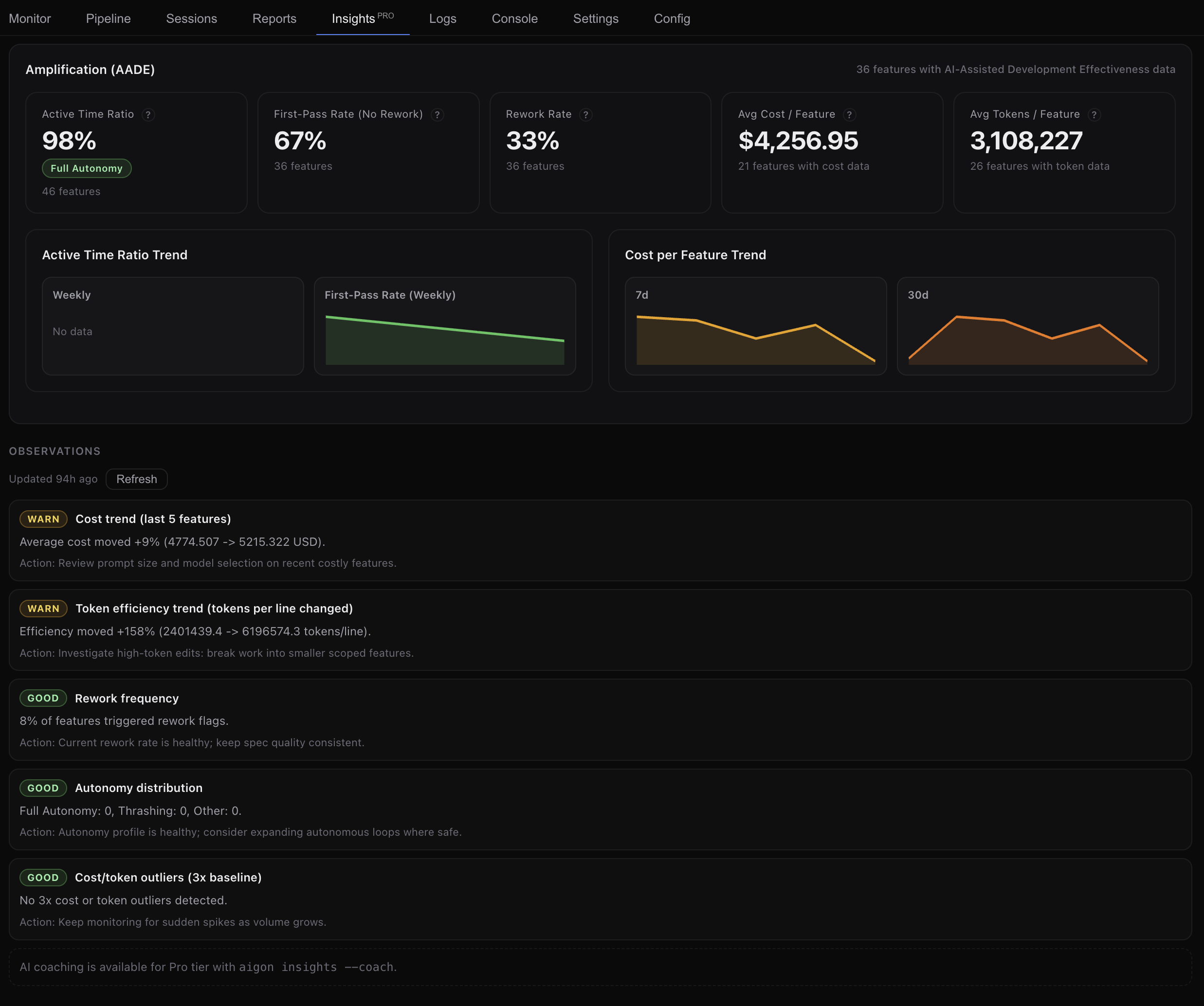
Pro Agent quality metrics, trend charts & AI-powered coaching See what’s coming →

Aigon Multi-agent coding harness

A spec-driven harness that orchestrates Claude Code, Codex, Cursor CLI and more.

Write a spec once. Launch competing implementations. Let one agent judge another. Merge the diff that survives review. Do it all from an intuitive kanban board.

  • Open-source
  • Spec-driven
  • BYO subscriptions
  • No SaaS lock-in
  • Local-first

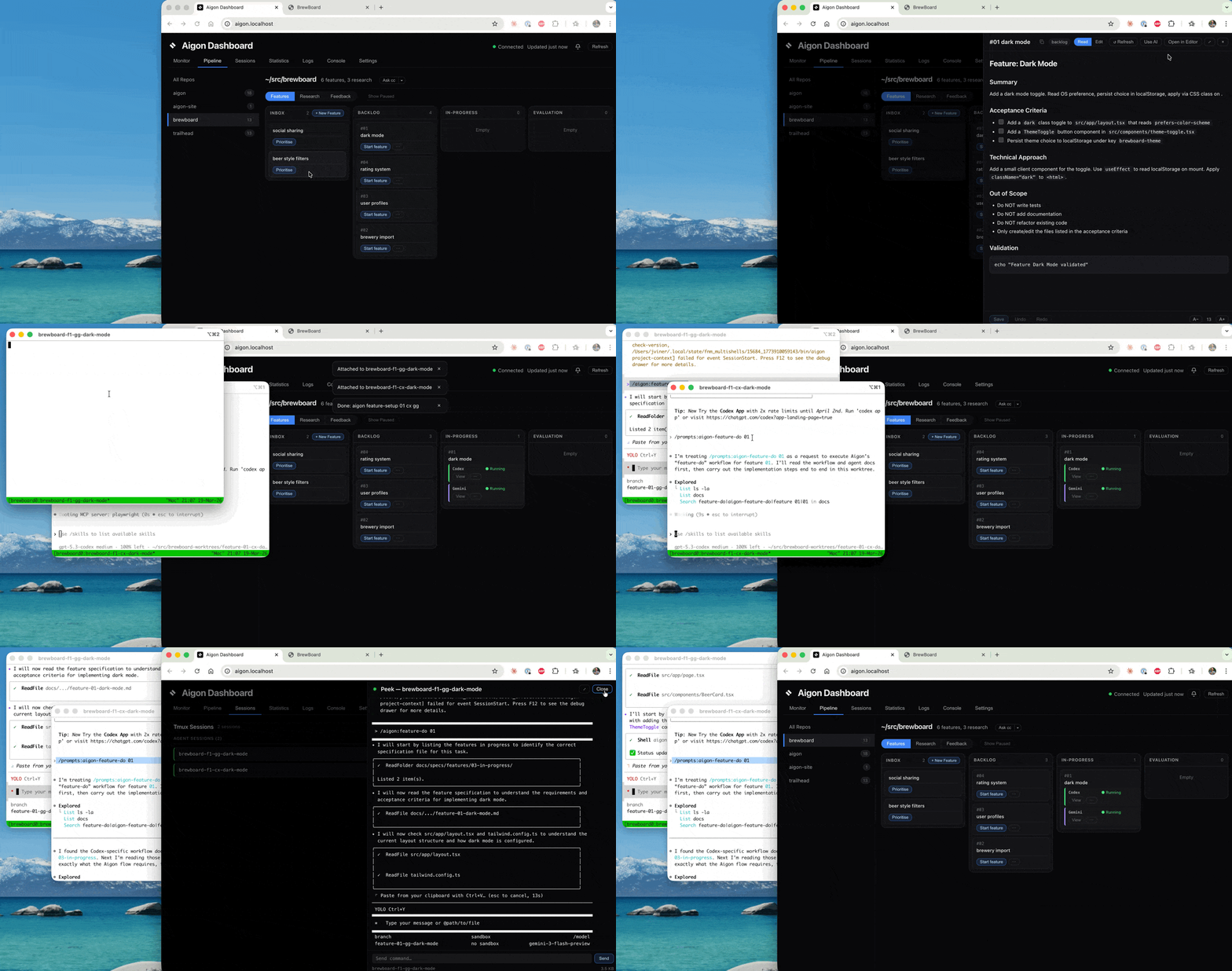
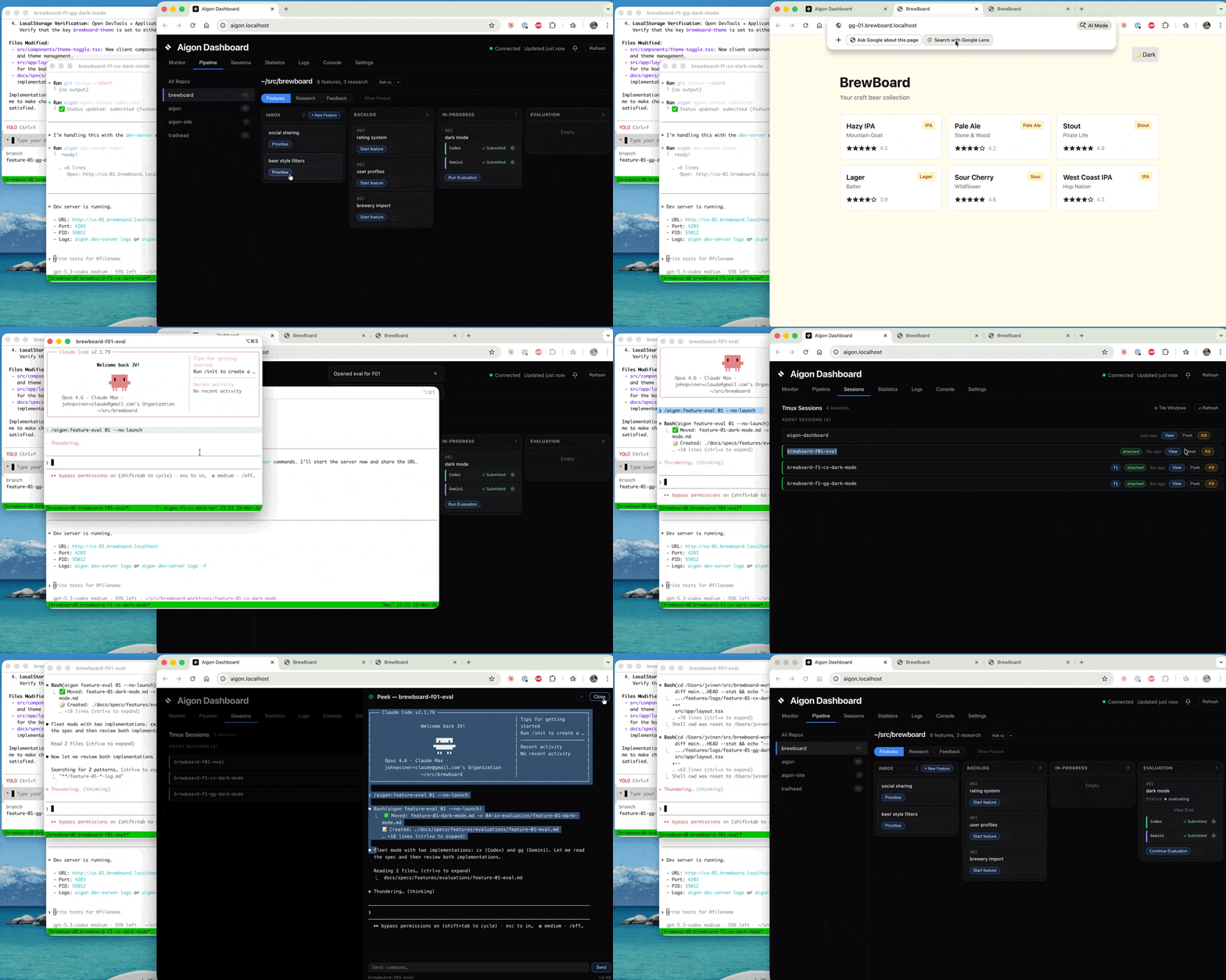
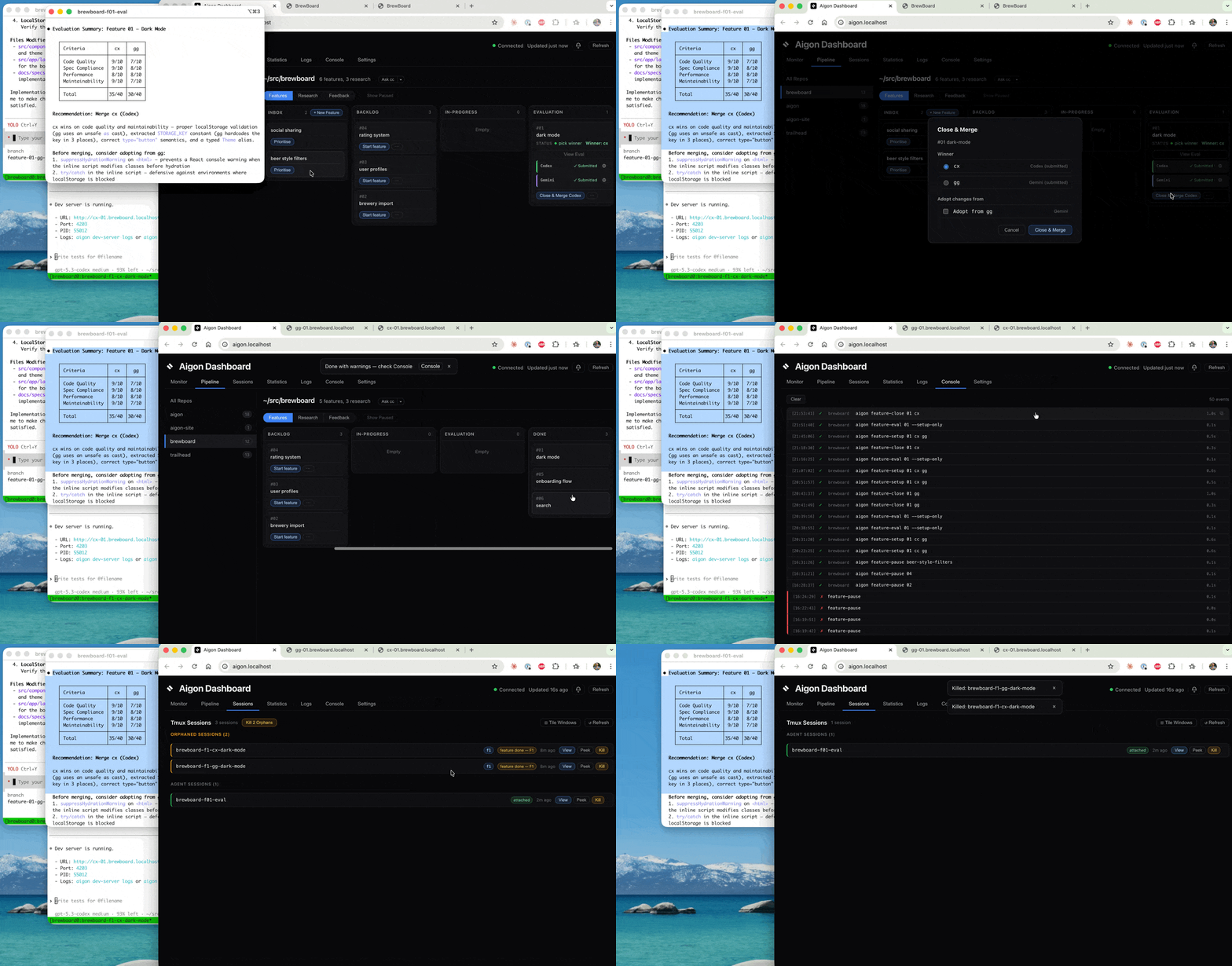
Aigon ships four modes — Drive, Fleet, Autopilot, and Swarm. Here's Fleet in 30 seconds:

Claude Code and Cursor compete, Codex evaluates — best implementation wins.

1. Fleet started — agents implementing in parallel

Fleet started — Codex and Gemini implementing in parallel

2. Both submitted — Codex evaluating

Claude Code evaluating the implementations

3. Evaluation complete — winner, Claude Code merged, with the best from Cursor implementation

Evaluation complete — winner selected and merged

Why use Aigon?

Four reasons one agent isn't enough.

01

Catch what one model misses.

Different model families catch different classes of bug. When Claude reviews Claude, the reviewer shares the implementer's blind spots. Aigon Fleet runs Claude Code, Codex, Cursor CLI (and more) in parallel against the same spec, with a different coding agent as the merge reviewer.

02

Stop hitting quota walls.

Agent subscriptions hit 5-hour quota limits. Aigon polls your quotas every 30 minutes, surfaces headroom on the dashboard, and auto-fails over to whichever coding agent still has quota. Three subscriptions, one elastic pool. Schedule specs to run when you have quota or while you sleep -- no more FONUT (Fear Of Not Using Tokens).

03

Use the subscriptions you already own.

Aigon never sits in your billing path. Spend the Claude Pro, ChatGPT Plus, and Cursor Pro subscriptions you already have — Aigon orchestrates the agent CLIs, not their underlying model APIs. No tokens, no markup, no metering.

04

Watch the work happen, locally.

Each agent runs in its own git worktree under tmux — tmux attach to any session and watch the work happen live. Specs live in your repo as Markdown; every workflow move is a git diff. No cloud sandbox, no opaque execution.

On disk, in your repo

Where your work lives — in plain files, in git.

The spec is the durable unit of work.

Each feature is a Markdown spec in your repo — not session state, not chat history. Build a feature, ship it, then run the same spec through a different agent if you want a fresh take. The spec is the constant; implementations come and go.

Source code, plus the “why” behind it.

Aigon doesn’t just store specs — it links them into a graph. Research findings feed feature specs. Feature implementations feed evaluations. Evaluations feed the next round. By the tenth feature, the eleventh agent doesn’t start cold — it reads the source code AND the full chain of intent that led to it.

Three workflows, one loop.

Most coding tools only handle “write the code.” Aigon ships three workflows that link: research investigates open questions, features deliver shipped code, feedback triages user input. Research findings become feature specs. User feedback becomes prioritised work. The loop before and after the build, not just the build.

CLI in action

Slash commands inside your agent — one workflow at every level of control.

How it works

Research, build, learn — on repeat.

Research Investigate options Feedback From real users Features Spec-driven tasks Build Agents implement Evaluate Compare & merge Ship

Choose your mode

Hands-on or hands-off, one agent or many.

Hands-on + one agent

Drive mode

Use when you want tight control over implementation details and review checkpoints.

aigon feature-start 07

Outcome: one guided implementation branch with a full spec and log trail.

Hands-on + multi-agent

Fleet mode

Orchestrate competing implementations you can evaluate and adopt the best from.

aigon feature-start 07 cc gg cx

Outcome: parallel worktrees and comparable outputs for structured selection.

Hands-off + one agent

Autonomous mode, Single Agent

Use when the scope is clear, but you want the peace of mind of a reviewing agent.

aigon feature-autonomous-start 07 cx --review-agent=cc --stop-after=closed

Outcome: automated implement-validate loop that stops when checks pass or budget ends.

Hands-off + multi-agent

Autonomous mode, Multi Agent

Fully orchestrated, fully autonomous — parallel agent runs converge into comparable outputs ready for auto evaluation and completion.

aigon feature-autonomous-start 07 gg cx --eval-agent=cc --stop-after=closed

Outcome: concurrent autonomous runs across agents with logs ready for comparison.

The steps

From idea to merged code.

Create a feature spec and move it into the backlog.

Your workflow, visualised

A Kanban board for spec-driven development.

The Aigon Dashboard is the visual way into your spec-driven workflow. Same pipeline, same agents — but managed through a browser UI instead of CLI commands. Drag features across columns, launch agent sessions with one click, and watch your pipeline move in real time. No terminal required.

Visual Workflow

Drag specs from inbox to done

Move features through your development pipeline with a familiar Kanban interface. Every column maps to an Aigon workflow state — no commands to memorise.

Monitor

See every agent, every repo, at a glance

The monitor tab shows running sessions, attention items, and recent events across all your repositories — everything you need to know at a glance.

Reports

Track what matters in your AI workflow

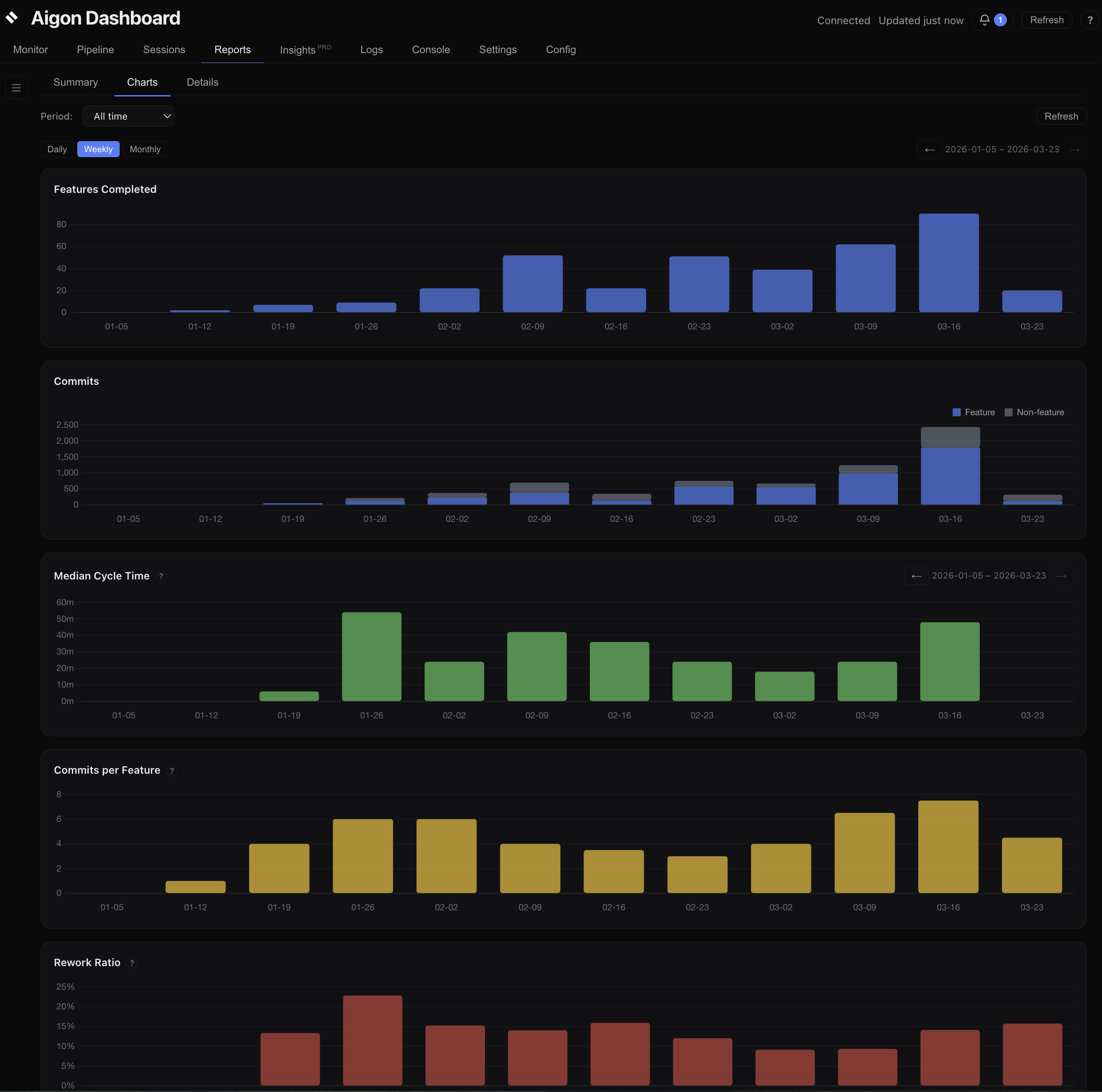
Five aligned charts — features completed, commits, cycle time, commits per feature, and rework ratio — show whether your team is shipping faster, writing tighter code, and fixing less. Summary cards, agent leaderboard, and filterable detail tables give you the full picture.

Telemetry

Cost & token visibility across all agents

Track token usage and cost across Claude, Gemini, and Codex sessions — broken down by activity type (implement, evaluate, review) and attributed per agent. See exactly where your spend goes. Learn more →

Remote Access

Monitor agents from your phone

The dashboard runs on your local network — open it on your phone or tablet over LAN, or use Tailscale to check on your agents from anywhere. Monitor from the couch.
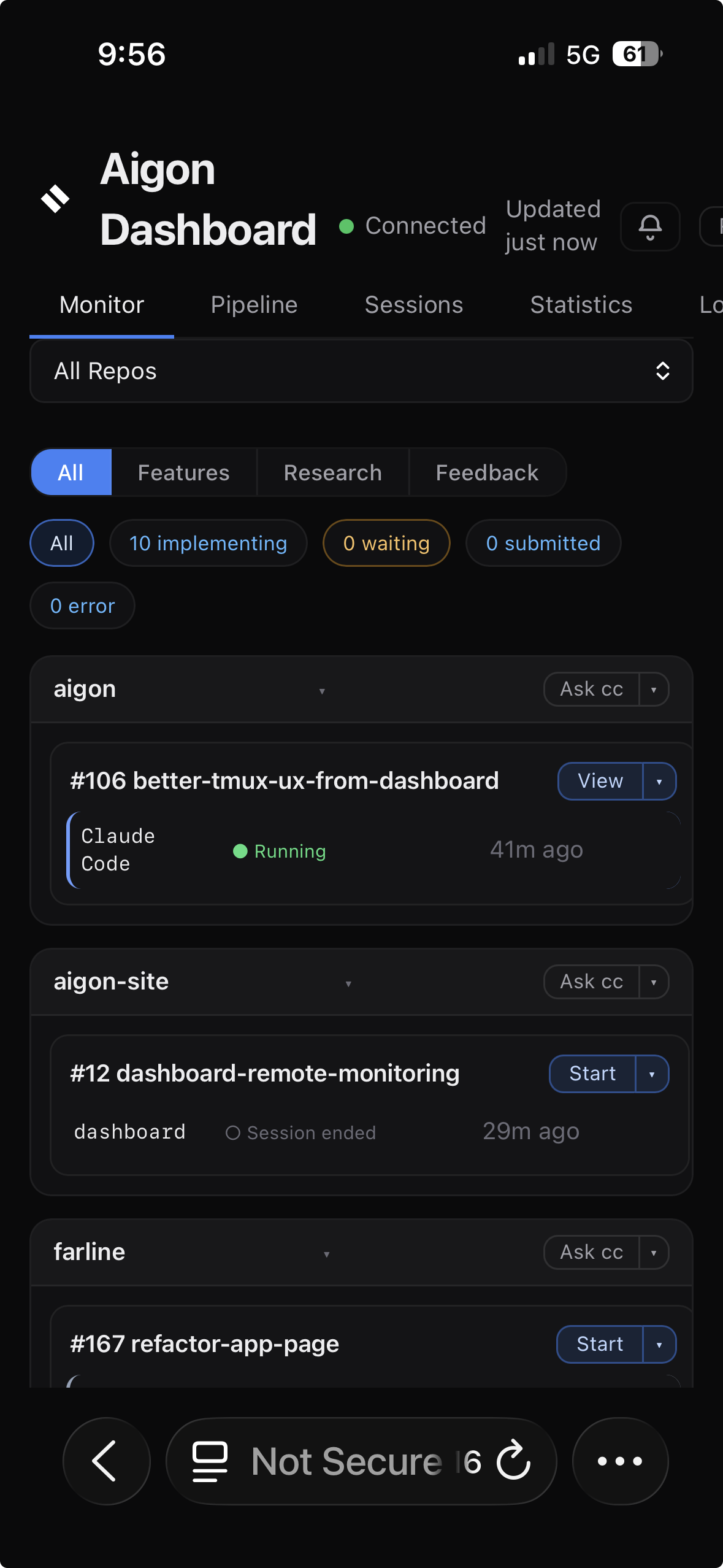
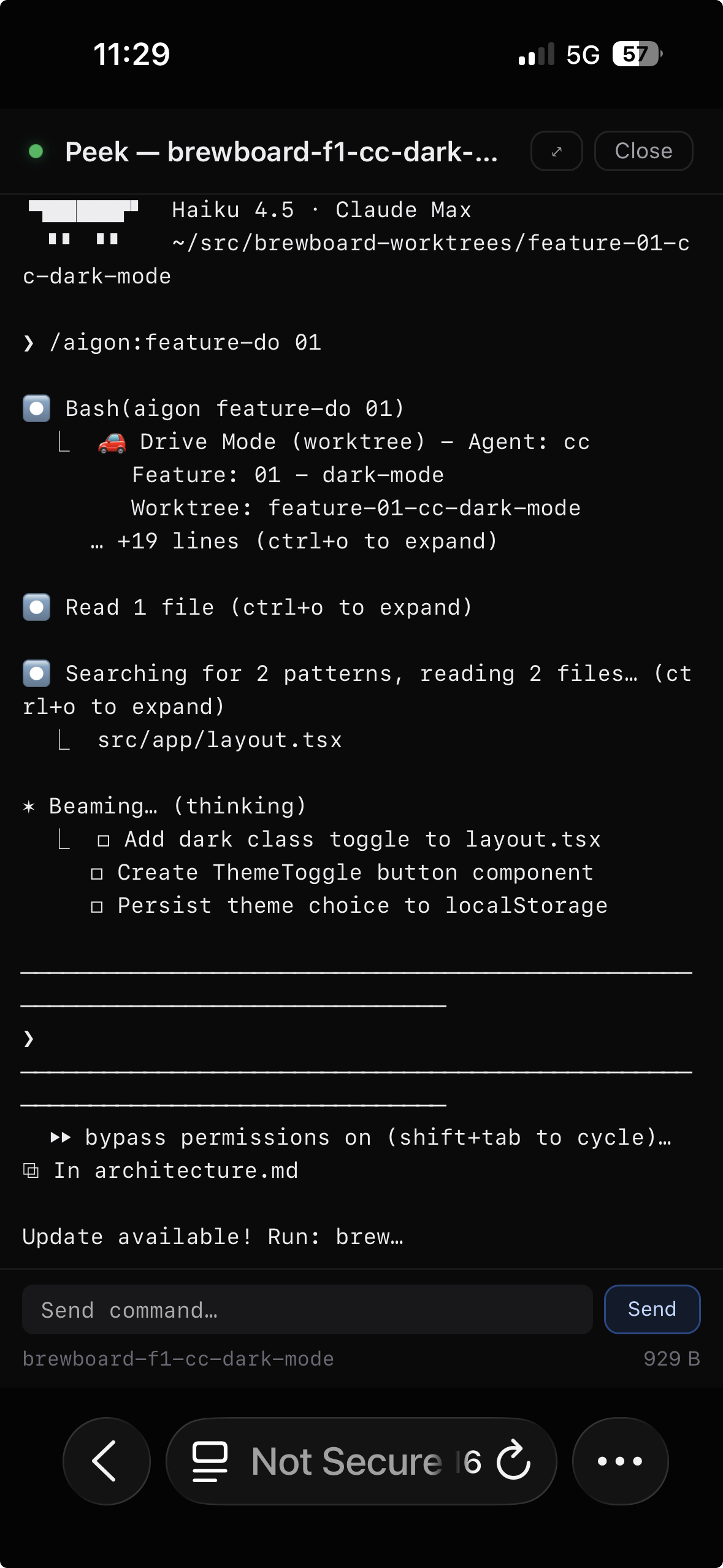
Aigon Dashboard viewed on iPhone Safari showing active agent sessions across multiple repositories Peeking into a live Claude agent session from iPhone — viewing real-time tool calls and reasoning

Workflow Intelligence

Know if your AI workflow is actually working

Five aligned charts track the metrics that matter: are features shipping faster? Are agents producing cleaner code? Is rework going down? Reports gives you the data to answer these questions — across every repo, every agent, every period.

Aigon Reports — five aligned charts showing features completed, commits, cycle time, commits per feature, and rework ratio

Feature velocity

Features completed and commits over time — stacked to show feature-attributed vs non-feature work.

Cycle time & focus

Median cycle time and commits-per-feature trending over time. See whether features are getting tighter.

Rework ratio

Percentage of fix commits per period. Trending down means agents are landing correct code on the first pass.

Community

Help shape the next generation of collaborative AI development.

Contribute specs, improve workflows, and share real-world patterns for running multi-agent engineering teams effectively.

Aigon Pro

From running features to operating a workflow.

Aigon Pro is the layer between “I shipped a feature” and “my workflow ships features” — autonomous runs on a schedule, agent quality metrics with AI coaching, benchmarks, and portable state across machines.

  • First-pass rate, rework ratio & agent leaderboard
  • Five synchronized trend charts — cycle time, commits, rework
  • Token usage & cost attributed per agent and phase
  • AI-generated observations & coaching
  • Agent benchmarks — reproducible perf timings across CC, Codex, Gemini, OpenRouter, Kimi
  • Reusable autonomous workflows — named stages saved to git, launched from CLI or dashboard
  • Scheduled autonomous runs — overnight, or aligned with quota refresh
  • Recurring features — cadence-driven template batches (weekly, quarterly)
  • Set-level autonomous orchestration — start, stop, resume entire feature sets
  • Aigon Sync — private Git vault for portable workflow state across machines
Explore Aigon Pro
Aigon Pro — AI-powered insights and coaching dashboard