 Aigon
Aigon
Aigon Pro
deeper insights into your AI development workflow
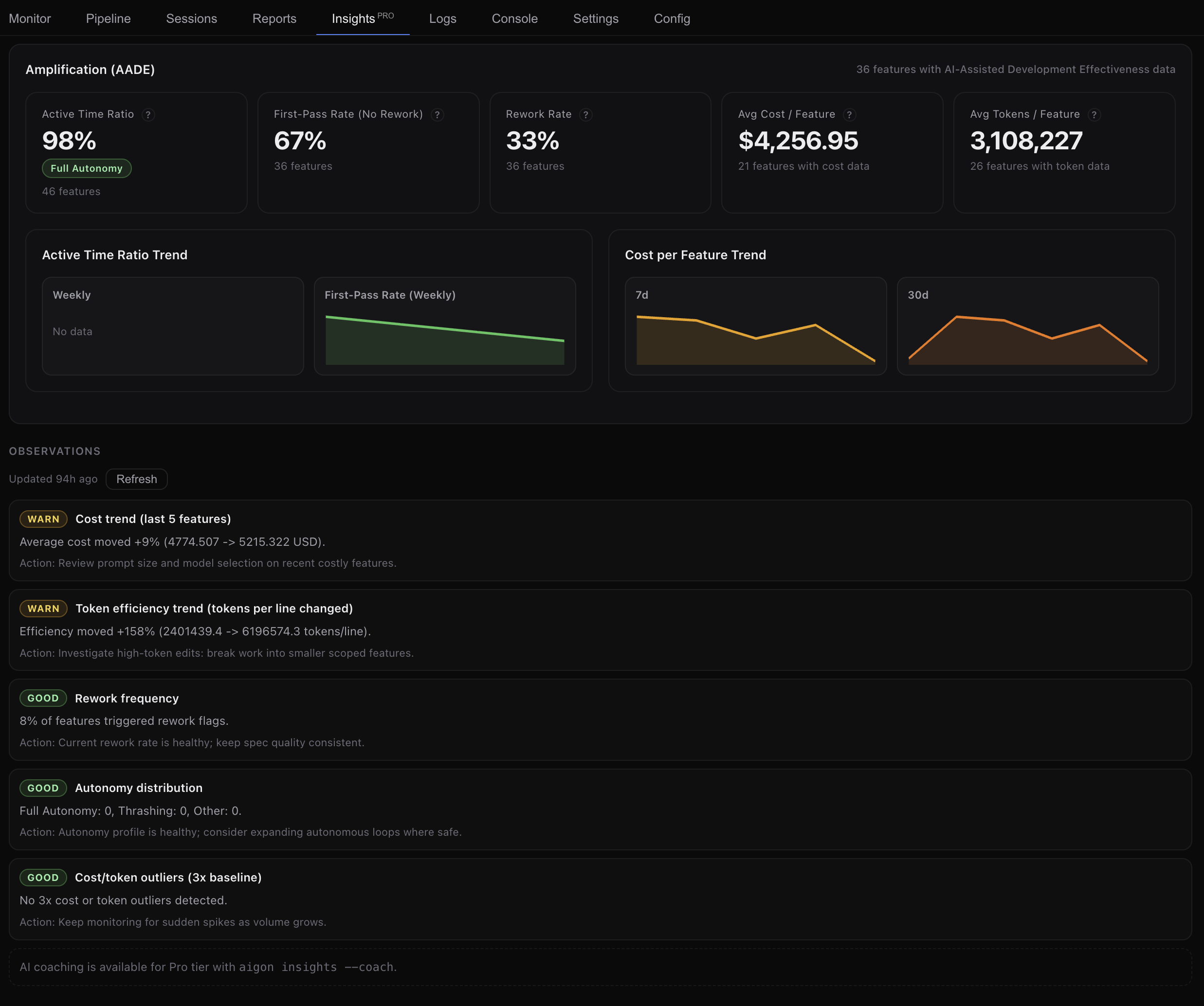
Aigon Pro adds agent quality metrics, trend charts, and AI-powered coaching to your dashboard — so you can see which agents deliver, how your workflow evolves, and where to improve.
Agent Quality
Metrics that matter
See at a glance how your agents perform. First-pass rate, commits per feature, and rework ratio give you a clear picture of code quality and efficiency.
First-Pass Rate
Percentage of features that pass evaluation on the first attempt — no rework needed.
Commits per Feature
Median commits per feature. Lower values mean more focused, single-pass implementations.
Rework Ratio
Percentage of commits that are fixes. Trending down means agents are getting it right the first time.
Trend Charts
Watch your workflow evolve
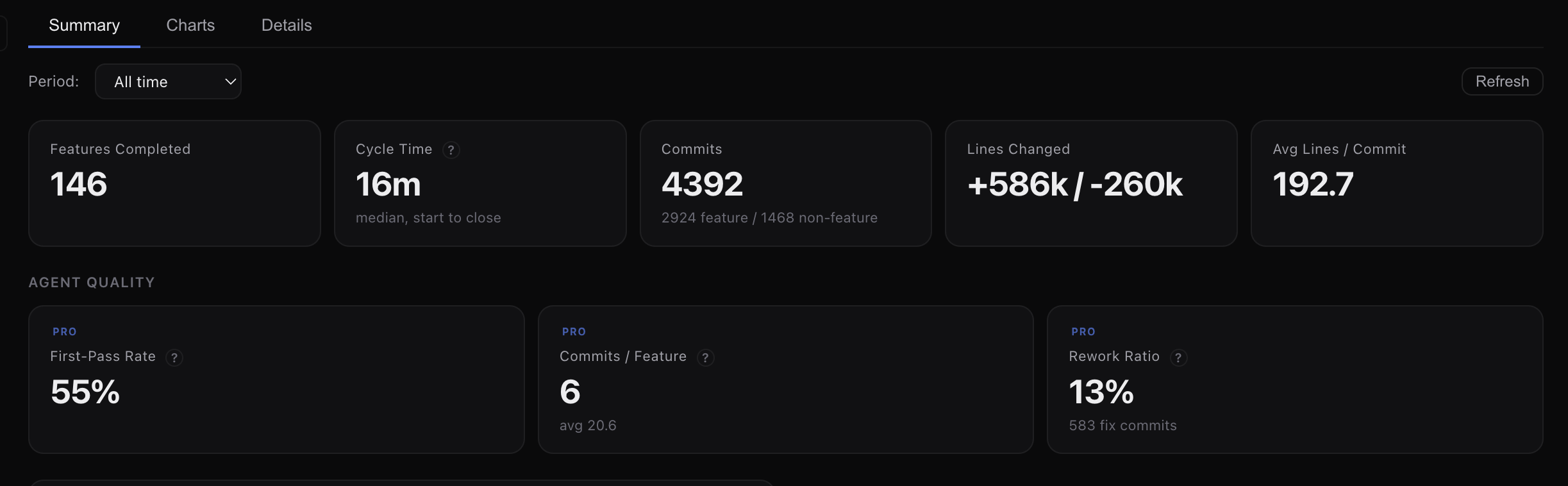
Five stacked charts with synchronized time axes — features completed, commits, cycle time, commits per feature, and rework ratio. Toggle daily, weekly, or monthly granularity.
Cycle Time Trends
Track how long features take from start to close. Spot bottlenecks and measure process improvements.
Rework Trends
See if fix commits are trending down over time — a signal that agent quality is improving.
Cost Visibility
See exactly where your spend goes
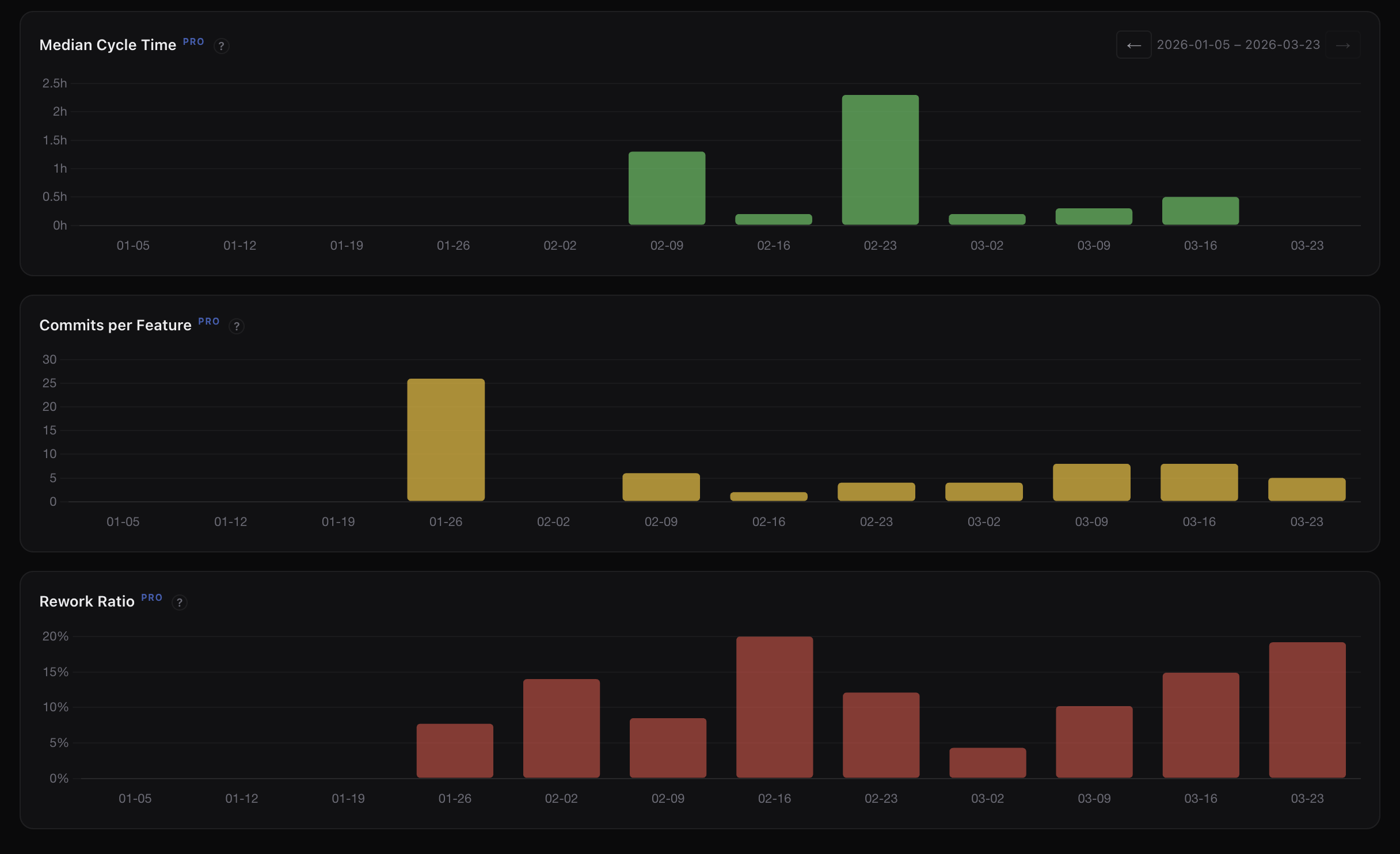
Token usage and cost tracked across every agent — broken down by phase, attributed per agent, and trended over time. No more guessing which features or workflows are expensive.
Per-Agent Attribution
See which agents consume the most tokens and cost the most per feature. Make informed decisions about when to use which agent.
Activity Breakdown
Costs split by implement, evaluate, and review phases. Understand where tokens are actually being spent across your workflow.
Cost per Feature
Track spend per feature over time. Spot expensive workflows before they compound — and measure the impact of process changes.
AI Insights
Coaching, not just charts
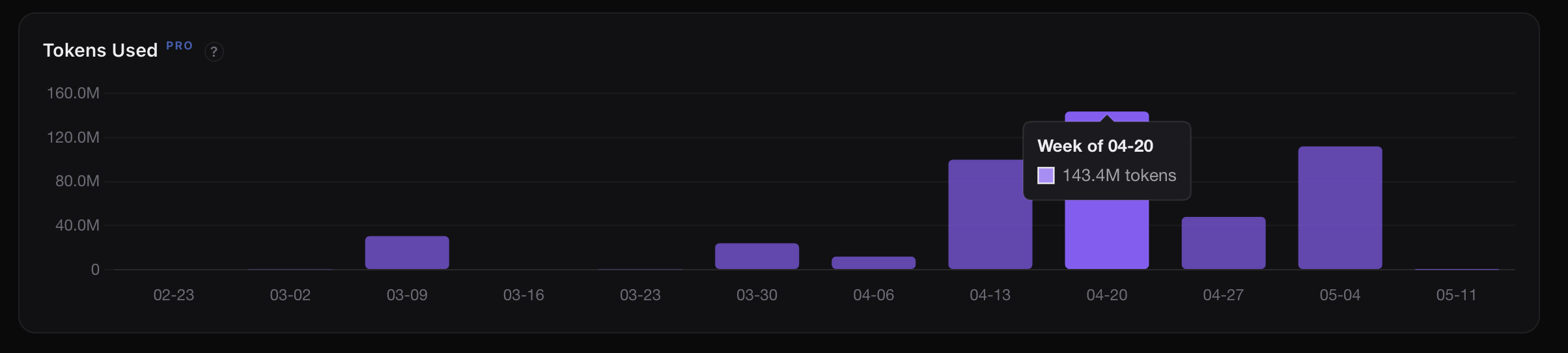
Aigon Pro analyses your development patterns and surfaces actionable observations — which agents excel at what, where cycle time stalls, and how to get more from your workflow.
Observations
AI-generated observations about your team’s patterns — what’s working and what’s not.
Coaching
Specific, actionable recommendations tailored to your workflow and agent mix.
Patterns
See which habits and workflows correlate with better outcomes so you can double down on what works.
Reusable Workflows
One-click autonomous orchestration
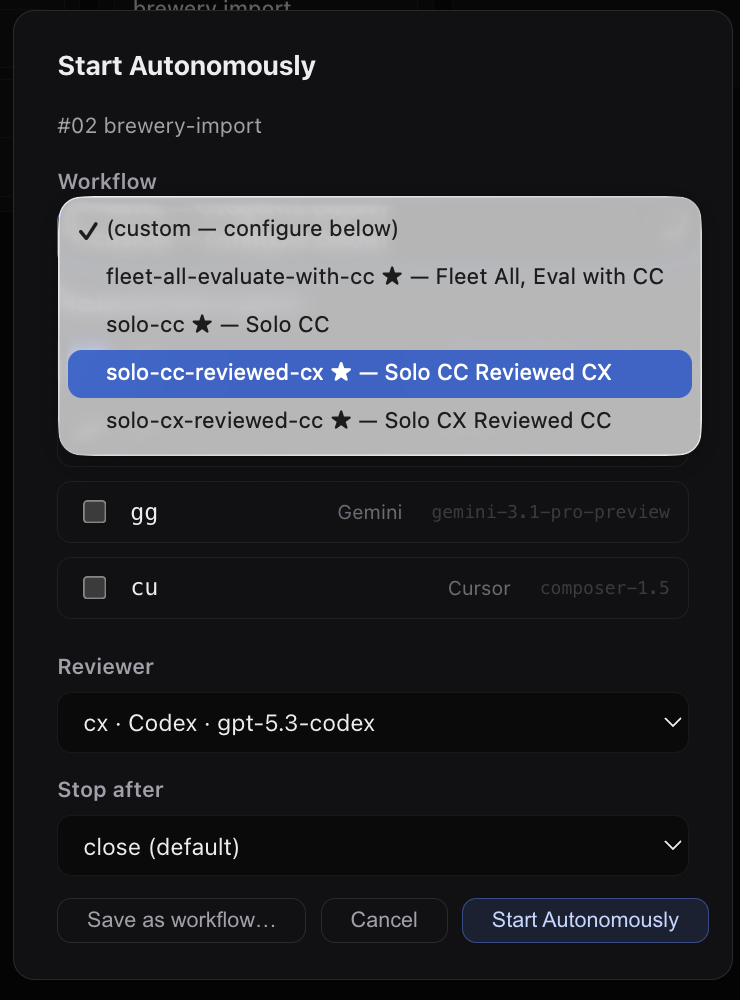
Save your favourite autonomous-run shapes as named workflows and launch them from the dashboard or CLI. No more retyping agent lists, reviewers, evaluators, or stop-after flags — pick a workflow and go.
Named Templates
Capture stages as a slug — implement, review, revision, eval, close — then launch with aigon feature-autonomous-start --workflow=<slug>.
Shared with Your Team
Project workflows live under .aigon/workflow-definitions/ and commit to git. Everyone on the repo gets the same configurations.
Dashboard Pre-fill
The Start Autonomously modal exposes a Workflow dropdown plus a Save as workflow button so you can capture and reuse configurations without leaving the UI.
Scheduled Features
Run when it actually works for you
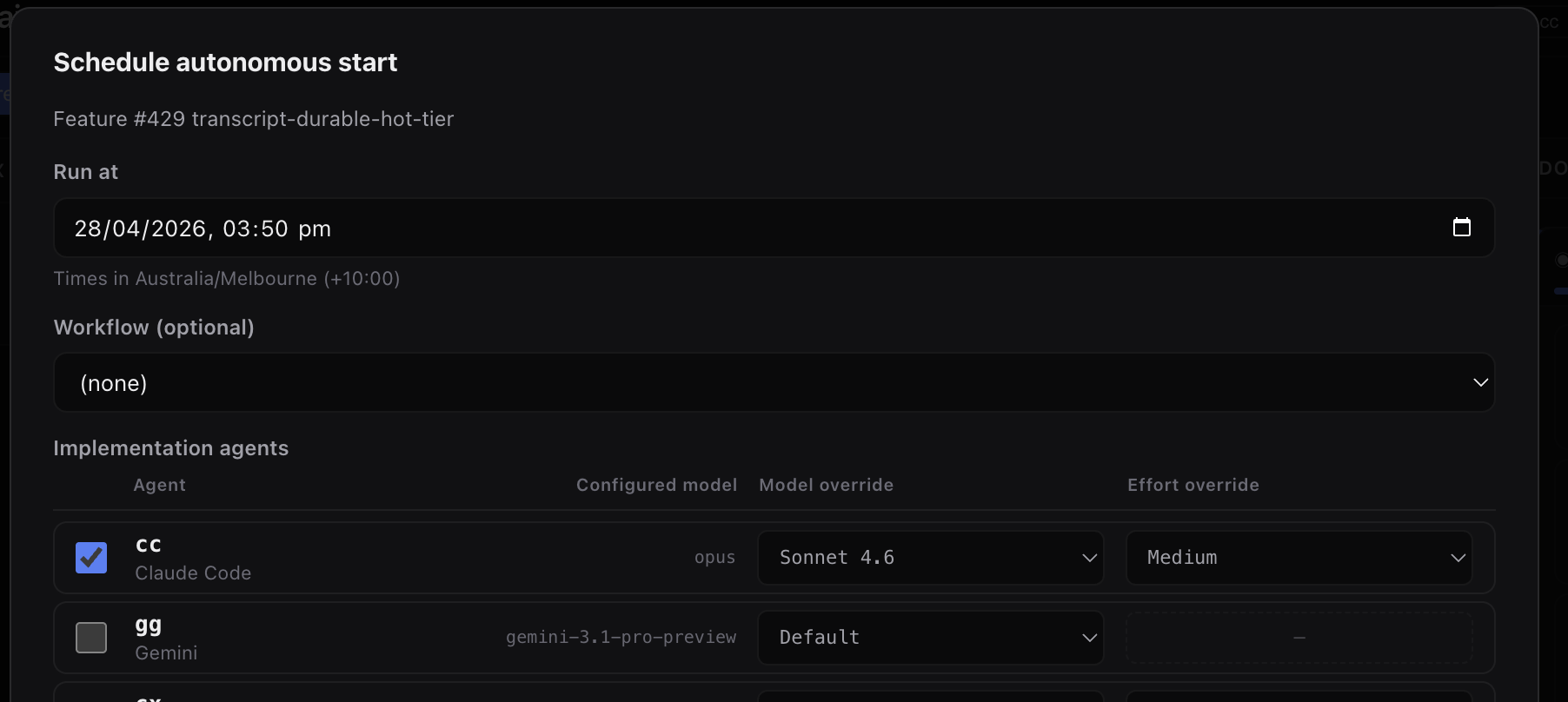
Schedule when Start Autonomously runs — the same predefined workflow from kickoff through completion, just at a wall time you choose.
Overnight runs
Queue a feature to start later and let long implement / eval cycles finish while you are away.
Align with quota refresh
If you are rate-limited or waiting on a rolling budget reset, schedule the kickoff for the moment your allowance comes back.
Starts on its own
You set the clock time once when you schedule. When that time arrives, the server launches the autonomous run for you.
Agent Benchmarks
How fast is each agent — across providers and models?
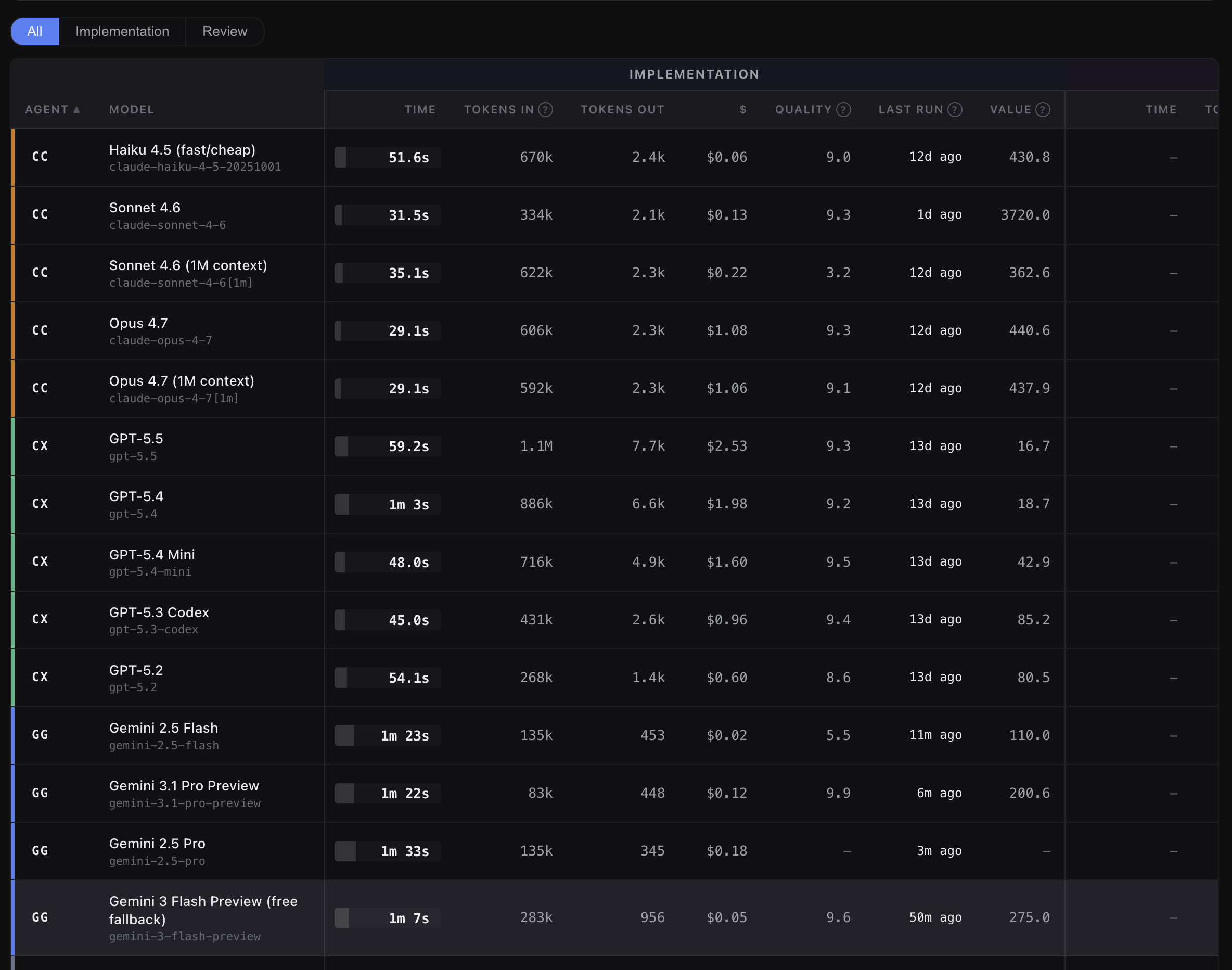
The benchmarks panel runs every supported agent and model against a small, deterministic seed repository and records end-to-end wall time, per-phase timing, and any failures.
Authoritative, reproducible numbers
Benchmark JSONs are captured on a deterministic seed repo and committed to the release. The results are identical regardless of who runs them.
One command to refresh
aigon perf-bench brewboard <agent> runs a single pair; --all sweeps every non-quarantined agent and model.
Failure context, not just dashes
When a model errors out, the failure reason is captured and shown in the row, so you can tell “not yet run” from “tried but failed” at a glance.
Ships with every release
A fresh benchmark sweep runs before each release tag and the JSON artifacts land in the release commit. Authoritative numbers from day one.
Aigon’s own overhead — measured, not assumed
Each benchmark records four phases — cli-start, agent-boot, agent-work, agent-signal — and a single-pair run also captures a bare claude -p baseline against the same task with no Aigon scaffolding. The difference, surfaced as overheadMs, is the cost Aigon’s orchestration adds on top of the bare provider call.
Reproducibility holds while models run provider-side. When aigon adds support for local model providers (Ollama, LM Studio, etc.), benchmarks for those entries will be machine-dependent and labelled accordingly.
State & Backup
Aigon Sync
Keep portable .aigon state in a private Git vault — push snapshots of workflow metadata, and pull down to another machine to resume your work.
Use Dashboard → Settings → Aigon Sync for remote URL, last sync times, cadence, and Sync now, or the aigon backup / aigon vault CLI.
Private vault repo
Configure one HTTPS or SSH remote; snapshots land in a structured layout Pro can pull and merge safely.
CLI + dashboard
Same engine from terminal (aigon backup push) or Settings → Aigon Sync when the server runs with @senlabsai/aigon-pro linked.
Scheduled pushes
Optional daily, hourly, weekly, or off — the server tick checks whether a vault push is due when Pro is installed.
Integrations
Aigon’s dashboard connects to tools you already use, starting with GitHub PR status on feature cards, with room for future integrations.