Aigon uses a unified aigon config command with two scopes:
- Project (
.aigon/config.json) — per-project settings - Global (
~/.aigon/config.json) — user-wide settings
Project scope is the default. Use --global for user-wide settings.
Config commands
# Initialise
aigon config init                           # Create project config (auto-detects profile)
aigon config init --global                  # Create global config

# Set values (dot-notation for nested keys)
aigon config set profile web
aigon config set --global terminalApp warp
aigon config set iterate.validationCommand "npm run test:iterate"
aigon config set fleet.testInstructions "run the repo's fast validation command"

# Get values (shows where the value comes from)
aigon config get terminal
aigon config get profile

# Show merged effective config
aigon config show
aigon config show --global
aigon config show --project

# View model configuration
aigon config models
Global config
Created with aigon config init --global at ~/.aigon/config.json:
{
  "terminal": "warp",
  "tmuxApp": "terminal",
  "agents": {
    "cc": { "cli": "claude", "implementFlag": "--permission-mode acceptEdits" },
    "ag": { "cli": "agy", "implementFlag": "--dangerously-skip-permissions" },
    "cx": { "cli": "codex", "implementFlag": "" },
    "mv": { "cli": "vibe", "implementFlag": "-p" }
  }
}
Project config
Created with aigon config init at .aigon/config.json:
{
  "profile": "web",
  "appId": "my-app",
  "devProxy": {
    "command": "npm run dev",
    "healthCheck": "/api/health",
    "basePort": 3000
  }
}
Configuration options
| Key | Scope | Description | Values |
|---|---|---|---|
terminal | Global | Default terminal for feature-open | warp, tmux, code, cursor, terminal |
tmuxApp | Global | Terminal app hosting tmux sessions | terminal (default), iterm2 |
profile | Project | Project type | web, api, ios, android, library, generic |
appId | Project | App domain for dev proxy | Auto-detected from package.json |
agents.{id}.cli | Global | CLI command for each agent | claude, agy, codex, vibe |
agents.{id}.implementFlag | Global | CLI flags for permission prompts | String (empty = manual approval) |
security.enabled | Global | Enable merge gate security scanning | true (default), false |
security.mergeGateStages | Global | Which scanners run at each stage | { featureClose: ['gitleaks', 'semgrep'] } |
github.prCheck | Project | Show GitHub PR status on dashboard cards | true (default), false to hide |
storage.backend | Project | SpecStore backend for workflow events | local (default), git-branch |
storage.git.remote | Project | Remote used by git-branch storage | Remote name such as origin |
storage.git.branch | Project | Branch holding canonical SpecStore state | aigon-state (default) |
storage.git.offline | Project | Skip pre-write sync for git-branch storage | false (default), true |
specLayout | Project | Durable spec-file layout | stable for new repos; legacy for unmigrated repos |
iterate.validationCommand | Project | Override the automatic iterate-mode validation command | String |
fleet.testInstructions | Project | Custom test instructions for Fleet mode | String |
devProxy.command | Project | Dev server start command | Default: npm run dev |
devProxy.healthCheck | Project | Path to verify server is up | Default: / |
devProxy.basePort | Project | Starting port for allocation | Default: 3000 |
worktreeSetup | Project | Shell command run once per worktree after git worktree add | String (single line; use && for composition) |
agents.{id}.availability | Global / Project | Structured agent availability preference | See Agent availability |
Agent availability
Turn supported agents on or off without editing templates. Disabled agents stay known to Aigon for historical snapshots, telemetry, and sessions — they are just hidden from normal start/review/eval pickers.
# Pause an agent you are not subscribed to (global scope is the default)
aigon agent disable km --reason=subscription-paused --note="Reduced Kimi subscription to $0"

# List grouped availability
aigon agent availability
aigon agent availability --all

# Re-enable later
aigon agent enable km
Structured config shape (written automatically by the CLI):
{
  "agents": {
    "km": {
      "availability": {
        "state": "disabled",
        "reason": "subscription-paused",
        "hidden": true,
        "note": "Reduced Kimi subscription to $0",
        "updatedAt": "2026-06-25T00:00:00.000Z"
      }
    }
  }
}
Legacy agents.<id>.disabled: true remains supported and resolves as disabled.
Precedence: registry retired is absolute. Maintainer deprecated agents are discouraged for defaults but may still be chosen explicitly (with a warning). Global user disabled outranks project config in v1. Temporary quota depletion is separate from user preference.
aigon install-agent --all still installs all known non-retired agents — installation is not usage.
If the profile-aware default is too broad for your repo, set an explicit iterate gate in .aigon/config.json:
{
  "iterate": {
    "validationCommand": "npm run test:iterate"
  }
}
Use this to point feature iteration at your fast, scoped validation command. Keep full-suite checks for the close or pre-push gate.
Storage backends
SpecStore controls feature and research workflow events, snapshots, leases, and related projections. Local storage is the default:
{
  "storage": {
    "backend": "local"
  }
}
Git-branch storage is opt-in. Prefer the conversion command because it validates remote push access and imports existing local workflow events:
aigon storage convert --backend=git-branch --remote=originThe resulting project config is:
{
  "storage": {
    "backend": "git-branch",
    "git": {
      "remote": "origin",
      "branch": "aigon-state",
      "offline": false
    }
  }
}
Git-branch storage syncs canonical workflow, lease, and stats events through a file tree on the configured state branch (default: aigon-state). Spec markdown and code changes still use normal Git. git-ref is retired; use aigon storage convert --backend=git-branch --remote=origin to migrate it. See Storage Backends for multi-clone behavior, leases, offline mode, and diagnostics.
Spec layout
Storage controls lifecycle state; specLayout controls where spec Markdown lives. New repositories default to the stable layout, which keeps canonical specs under docs/specs/features/00-specs/ and docs/specs/research-topics/00-specs/. Lifecycle folders are generated symlink views and should not be edited or moved manually.
Existing repositories keep the legacy stage-folder layout until you explicitly migrate them:
aigon spec-layout status
aigon spec-layout migrate --stable --dry-run
aigon spec-layout migrate --stable --yes
See spec-layout and spec-view for the migration and generated-view commands.
Per-worktree setup (worktreeSetup)
Worktrees are fresh checkouts — they do not share node_modules, virtualenvs, or any other build artefacts with your main repo. If your agents need those to exist before they start, set worktreeSetup in .aigon/config.json:
{
  "worktreeSetup": "npm ci"
}
When it runs: after git worktree add and .env.local is written, before the agent launches. One execution per worktree.
Where to set it: .aigon/config.json (project scope). Aigon does not detect or guess your stack — you tell it what to do.
Examples:
{ "worktreeSetup": "npm ci" }{ "worktreeSetup": "ln -s ../../node_modules node_modules" }The symlink form is faster (under a second) when your project’s tooling tolerates a linked node_modules. The install form is safer when it doesn’t.
Failure semantics: the command runs with a 120-second timeout. If it fails or times out, Aigon warns and continues — the agent launches anyway and can retry.
Anti-pattern: Aigon does not detect or guess your stack. There is no built-in pnpm/yarn/bun/pip/cargo fallback. If you need per-worktree setup, declare it explicitly via worktreeSetup.
Precedence
Priority order: Environment variable > Project config > Global config > Defaults
Use aigon config get <key> to see which level a value comes from. Set AIGON_TERMINAL=code to override the terminal for a single session.
Project profiles
Aigon auto-detects your project type and adapts behaviour accordingly:
| Profile | Detected By |
|---|---|
ios | *.xcodeproj, *.xcworkspace, Package.swift |
android | build.gradle, build.gradle.kts |
web | package.json with scripts.dev + framework config |
api | manage.py, app.py, main.go, server.js |
library | Cargo.toml, go.mod, pyproject.toml, setup.py |
generic | Fallback when nothing matches |
aigon profile detect        # See what Aigon auto-detects
aigon profile show          # View current profile and settings
aigon profile set ios       # Override auto-detection
aigon apply                 # Regenerate templates after changing profile
Profile behaviour
web/api: Dev server enabled, agent-specific ports assigned,.env.localcreated in worktreesios/android/library/generic: No dev server, no PORT, project-appropriate test instructions
Port configuration (web/api profiles)
PORT=3400 in .env → cc=3401, ag=3402, cx=3403, cu=3404, mv=3405Ports are derived from your base PORT using fixed offsets, avoiding clashes when running multiple projects.
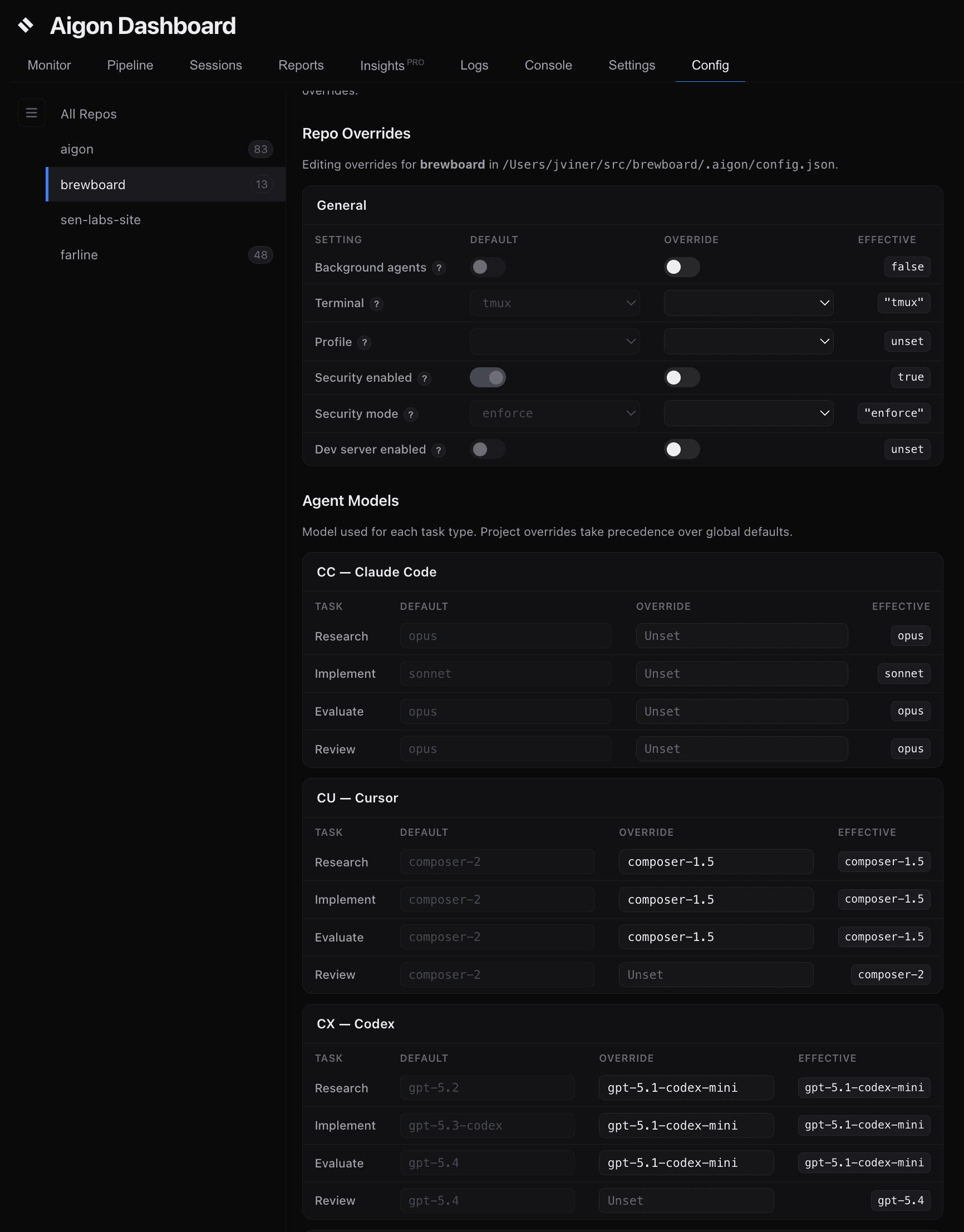
Model selection
Per-agent, per-task model selection:
# View resolved models
aigon config models

# Override for specific agent/task
aigon config set agents.cc.models.research haiku
aigon config set agents.ag.models.evaluate gemini-3.5-flash-medium

# Per-session override via env var (highest priority)
AIGON_CC_RESEARCH_MODEL=haiku aigon config models
Env var pattern: AIGON_{AGENT}_{TASK}_MODEL where AGENT is CC/AG/CX/CU and TASK is RESEARCH/IMPLEMENT/EVALUATE.
Spec complexity: Feature and research specs can declare a complexity level in YAML frontmatter. When you start work from the dashboard, that label pre-selects model and effort via each agent’s complexity ladder, then your config defaults. Global keys above apply when you pick Default in the picker or when complexity is missing. See Agents → Spec complexity and model defaults.
CLI flag overrides
Default “yolo mode” flags auto-approve agent commands:
| Agent | Default flag | Effect |
|---|---|---|
cc (Claude) | --permission-mode acceptEdits | Auto-edits, prompts for risky Bash |
cu (Cursor) | --force | Auto-approves commands |
ag (Antigravity) | --dangerously-skip-permissions | Auto-approves all |
cx (Codex) | (empty) | Interactive by default |
cp (GitHub Copilot) | --allow-all --interactive | Auto-approves tool use in the interactive TUI |
The full per-agent table, including op, km, and am, is in the Agents reference.
For stricter permissions:
aigon config set --global agents.cc.implementFlag ""Set implementFlag to "" (empty string) to require manual approval prompts.
Hooks
Hooks let you run custom scripts before and after Aigon commands. Define hooks in docs/aigon-hooks.md:
## pre-feature-start

\`\`\`bash
if [ "$AIGON_MODE" = "fleet" ]; then
  for agent in $AIGON_AGENTS; do
    neon branches create --name "feature-${AIGON_FEATURE_ID}-${agent}"
  done
fi
\`\`\`
Hook behaviour
- Pre-hooks run before the command. Failure aborts the command.
- Post-hooks run after. Failure warns but doesn’t roll back.
Environment variables in hooks
| Variable | Description |
|---|---|
AIGON_COMMAND | The command being run |
AIGON_PROJECT_ROOT | Root directory of the project |
AIGON_MODE | Current mode: “drive” or “fleet” |
AIGON_FEATURE_ID | Feature ID |
AIGON_AGENTS | Space-separated list of agents |
AIGON_AGENT | Current agent name |
AIGON_WORKTREE_PATH | Path to current worktree |
aigon hooks list # Inspect discovered hooks