Synopsis
aigon feature-code-review <ID>Shortcuts
/afr(slash command) ·aigon afr(CLI)
Description
feature-code-review assigns a reviewer agent to inspect and fix a feature’s implementation. Unlike a traditional read-only review, this is a write-capable review pass — the reviewing agent reads the diff, identifies concrete issues, and patches them directly in the feature worktree with fix(review): ... commits. A findings-only report is appropriate only when issues require architectural decisions or missing context that the reviewer cannot resolve alone.
For the best results, use a different model than the implementer. Model diversity catches different classes of bugs.
The reviewer checks: correctness against acceptance criteria, out-of-scope file deletions, test coverage, and code quality — in that priority order.
What it does
- Fetches the full diff (
git diff main..feature-<ID>-*) and the implementation log - Runs
aigon agent-status reviewingto signal the dashboard - Checks for out-of-scope deletions (files not related to the spec)
- Reviews correctness against the spec’s acceptance criteria
- Patches issues directly in the feature worktree with
fix(review): ...commits - Signals
review-completewhen done
Dashboard card after review
Once the reviewer signals completion, the card shows a verdict badge below the reviewer’s status line. There are two outcomes:
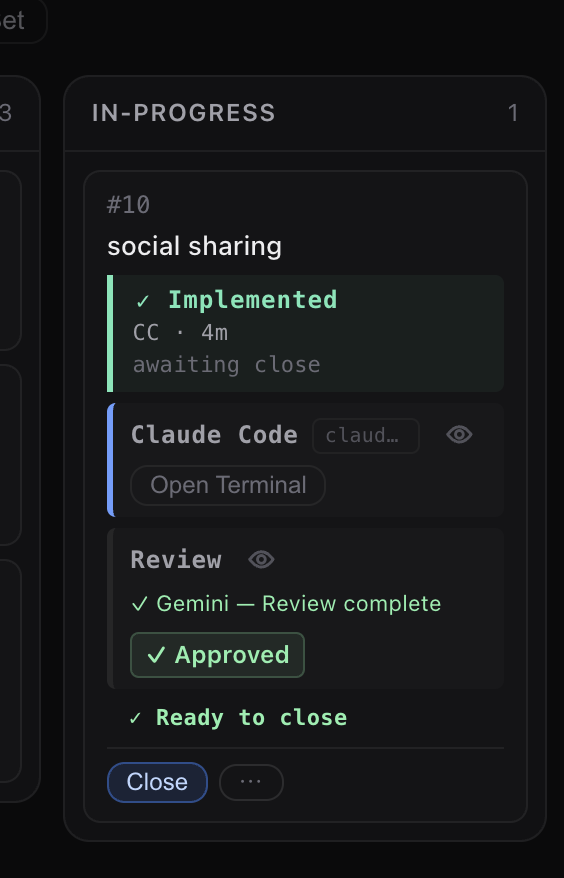
✓ Approved — reviewer found no issues. The feature is ready to close as-is.
The card shows a revision-requested status while the implementer works through review findings.
⚠ Revision requested — issues found. Use Address review from the ⋯ menu to start a revision pass.
The eye icon (👁) next to “Review” lets you peek at the reviewer’s session to read the full findings before deciding whether to revise or close.
Examples
# Run a code review on feature 42
aigon feature-code-review 42

# From within an agent session (use a different model than the implementer)
/aigon:feature-code-review 42
When to use
Use feature-code-review in the solo Drive mode workflow — after the implementer submits, before closing. In Fleet mode, use feature-eval to compare implementations instead.
For the automated equivalent (AutoConductor runs review for you), see feature-autonomous-start --review-agent=<agent>.
Recovery
If the current review is bad, stuck, or using the wrong reviewer/model, cancel it and start a new one:
aigon feature-cancel-code-review 42
aigon feature-code-review 42
If the feature is still under autonomous orchestration, stop that first:
aigon feature-autonomous-stop 42
aigon feature-cancel-code-review 42
aigon feature-code-review 42
Related
feature-eval— compare Fleet implementations (use instead of code-review in Fleet mode)feature-cancel-code-review— cancel a bad in-progress review and return to readyfeature-autonomous-stop— stop AutoConductor before manual recoveryfeature-close— merge after review is completefeature-autonomous-start— run implement + review + close automatically- Drive Mode guide