The Pipeline tab shows a Remaining quota before reset panel: a read-only snapshot of how much headroom you have in each vendor’s rolling windows before throttling. It is not the same as token telemetry (post-session spend); it is the live subscription / rate-limit style data those CLIs expose.
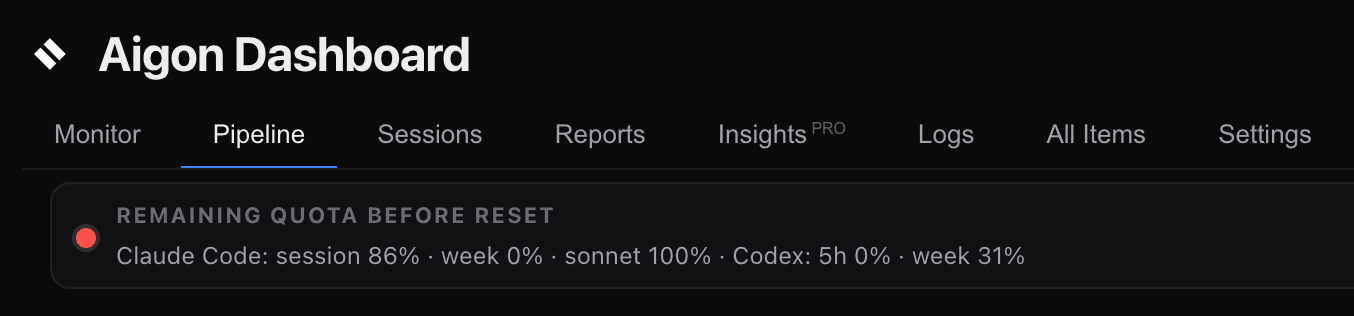
What you see
- Claude Code — session, weekly, and (when present) Sonnet-specific remaining percentages, plus reset hints from the CLI output.
- Codex — short-window (e.g. five-hour) and weekly remaining percentages, plus plan / credit hints when the Codex app-server returns them.
- Antigravity CLI — unavailable for automatic polling; Aigon never starts its interactive CLI to scrape quota.
- Kimi Code CLI — usage tiers when the CLI exposes them.
- GitHub Copilot CLI — not polled; the Copilot CLI exposes no quota readout to Aigon, so
cpshows usage unavailable. Check your Copilot usage on GitHub instead.
Each bar is remaining headroom for that window (not “used”). 0% means that window is already exhausted until it resets.
Colours
Bars and the small status dot use the same bands:
| Colour | Meaning |
|---|---|
| Green | ≥ 50% of that window still available |
| Amber | 20–49% remaining |
| Red | < 20% remaining |
| Gray | Stale poll or no numeric data yet |
The dot is the worst band across every numeric limit shown for enabled agents — if Codex is red and Claude is green, the dot is red.
Collapse and refresh
Use Collapse / Expand on the panel header to reclaim vertical space. When collapsed, you still get the dot, title, one-line summary, updated … time, and ↻ refresh.
↻ asks the server to poll again (subject to backend availability). The dashboard also refetches periodically so “updated Xm ago” stays honest.
Where the data comes from
Roughly every 30 minutes the Aigon server runs one coordinated poll (budget scrape → headless probe → provider wallet when configured):
- Polls Claude Code and Kimi Code CLI via short-lived tmux sessions that drive their usage views. Antigravity is deliberately skipped to avoid triggering OAuth.
- Reads Codex limits from the local Codex app-server (
account/rateLimits/read). - Runs headless quota probes and provider HTTP checks in the same tick.
Results are written to .aigon/state/agent-quota.json in the repo the server runs from; the UI reads GET /api/agent-quota. If a supported source is unavailable, that agent’s card shows usage unavailable and polling is skipped — no error spam.
Polls older than about 90 minutes are treated as stale (gray) so you are not misled by an old snapshot.
Start flows
When you start Fleet, autonomous, or set runs from the dashboard, Aigon can warn if selected agents are already in the red band on any limit — you can still proceed after confirming.
See also
- Agent Quota Awareness — how the dashboard uses quota context to help you choose implementation agents
- Dashboard — full Pipeline tab tour
- Telemetry & Analytics — token and cost history after sessions complete