Aigon integrates with GitHub pull requests so that feature-close is aware of PR state, and the dashboard shows PR status on feature cards. This is entirely optional — if you don’t create a PR, Aigon closes features locally as it always has.
Prerequisites
- Your repo
originpoints to GitHub ghCLI is installedgh auth statussucceeds for the account that owns the repo access
If these are missing, the PR gate silently falls back to local close, and the dashboard shows status as unavailable.
PR-aware close gate
When you run feature-close on a repo with a GitHub origin and the gh CLI installed, Aigon automatically checks for a PR on the feature branch:
| PR state | What Aigon does |
|---|---|
| No PR exists | Normal local close (merge branch, clean up) |
| PR is open | Blocks close with a message — merge or close the PR first |
| PR is draft | Blocks close — publish or close the draft first |
| PR is merged | Syncs local main from origin and finishes the close |
No configuration is required. The gate activates automatically when all three conditions are met:
- Your repo’s
originremote points to GitHub - The
ghCLI is installed and authenticated - A PR exists for the feature branch targeting your default branch
Recommended workflow
1. Implement the feature
Use any Aigon mode (Drive, Fleet, Autopilot) to build the feature as normal.
2. Push the branch
From the dashboard, click Push in the feature card overflow menu (⋯). Or from the CLI:
aigon feature-push        # auto-detects from worktree branch
aigon feature-push 07     # explicit ID from main repo
3. Create a pull request
Create the PR on GitHub — through the web UI, gh pr create, or however you prefer. Aigon does not create PRs for you.
4. Check PR status on the dashboard
After an agent submits, the feature card shows a GitHub section. Click Check PR status to fetch the current state.
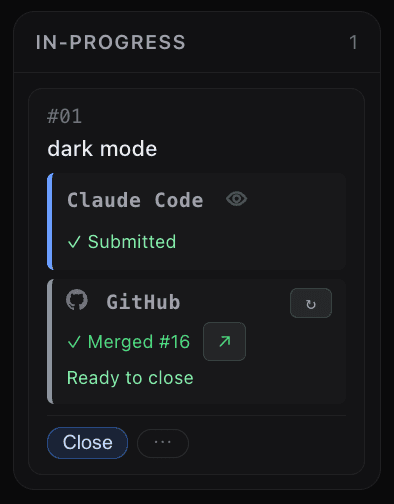
The status badge links directly to the PR on GitHub. After the first fetch, use the refresh button (↻) to update.
5. Close the feature
aigon feature-close 07If the PR is merged, Aigon syncs your local main branch from origin and completes the close. If the PR is still open, Aigon blocks and tells you what to do.
Dashboard status reference
| Status | What it means | What to do |
|---|---|---|
| No PR | No pull request was found for the feature branch. | Create a PR if you want remote review, or continue with local close workflow. |
| Open | A PR exists and is open. | Continue review and merge in GitHub before running feature-close. |
| Draft | A PR exists but is still draft. | Mark ready for review or close it if no longer needed. |
| Merged | The PR was merged on GitHub. | Run feature-close to finalize local state and cleanup. |
| Unavailable | Could not determine status (missing auth, non-GitHub remote, or CLI issue). | Verify gh install/auth and remote setup, then refresh again. |
Close button warning
If a PR is not merged yet, the feature card can show an orange close-state warning. This indicates remote review is still in progress. The close action remains visible so you can retry after a refresh, but feature-close may block until the PR is merged or closed.
Without PRs
If you never push or create a PR, nothing changes. feature-close works exactly as before — local merge, cleanup, done. The PR gate only activates when it detects a PR exists for your branch.
Disabling dashboard GitHub status
If you don’t use GitHub PRs and don’t want the PR status section appearing on dashboard cards, set github.prCheck to false in your project config:
aigon config set github.prCheck falseOr add it directly to .aigon/config.json:
{
  "github": {
    "prCheck": false
  }
}
This disables GitHub PR checking entirely: the PR status section is hidden from dashboard feature cards, and feature-close skips the open-PR gate.
Limitations
- Manual refresh only (no automatic polling)
- Only GitHub is supported (GitLab, Bitbucket are not checked)
- Aigon does not create PRs — you do that yourself
- If
ghauth fails, the gate silently degrades to local close - Read-only status visibility (Aigon does not edit PRs)