Autonomous mode lets you start a feature and walk away. The AutoConductor — a dedicated background tmux session — watches workflow state and triggers the next stage automatically.
How it works
The AutoConductor polls the workflow-core engine every 30 seconds. When a stage completes, it invokes the next command automatically, then kills itself cleanly when done.
It is deliberately lightweight — it holds no orchestration state. If it dies, the feature continues normally and can be completed manually.
Two autonomous modes
Autonomous mode behaves differently depending on how many implementation agents you provide:
Solo + reviewer (one agent)
One agent implements in an isolated worktree. Optionally, a second agent reviews the implementation before the feature closes.
feature-autonomous-start 42 cc [--review-agent=ag]
         ↓
AutoConductor spawns (auto tmux session)
         ↓
cc implements in worktree
         ↓ submits
[ag reviews — optional]
         ↓ review-complete signal
feature-close → done ✅
Without --review-agent, the feature closes immediately after the implementation agent submits.
Fleet + evaluator (multiple agents)
Multiple agents compete in parallel worktrees on the same spec. When all signal implementation-complete, a designated evaluator agent compares implementations and picks a winner.
feature-autonomous-start 42 cc ag [--eval-agent=cc]
         ↓
AutoConductor spawns (auto tmux session)
         ↓
cc and ag implement in parallel worktrees
         ↓ both signal implementation-complete
cc evaluates — writes **Winner:** to eval file
         ↓
feature-close <winner> → done ✅
The evaluator reads both implementations and writes **Winner:** <agent> to the eval file. The AutoConductor parses this and calls feature-close directly — no LLM relay, no manual step.
Starting autonomously
From the dashboard
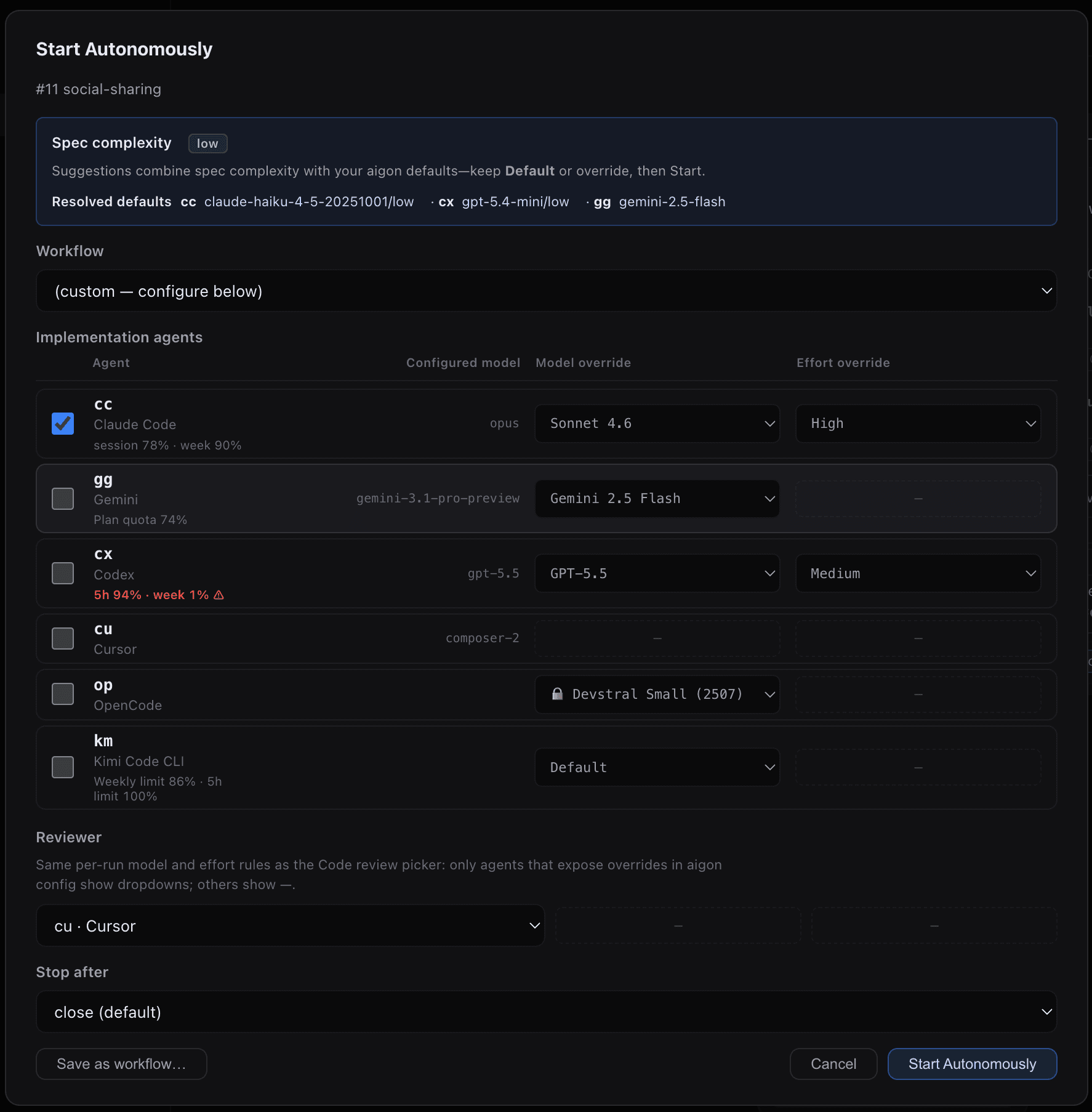
Click Start Autonomously on any backlog feature card. The modal adapts to the number of agents you select:
- One agent selected → shows a Reviewer picker and offers
stop-after: revieworclose - Multiple agents selected → shows an Evaluator picker and offers
stop-after: evalorclose
From the CLI
# Solo — implement then close, no review
aigon feature-autonomous-start 42 cc

# Solo + review — implement, review with ag, then close
aigon feature-autonomous-start 42 cc --review-agent=ag

# Solo + review — stop after review starts (review manually, close when ready)
aigon feature-autonomous-start 42 cc --review-agent=ag --stop-after=review

# Fleet — two agents, auto eval and close
aigon feature-autonomous-start 42 cc ag --eval-agent=cc

# Fleet — stop after eval (pick winner manually)
aigon feature-autonomous-start 42 cc ag --eval-agent=cc --stop-after=eval

# Stop after implement only
aigon feature-autonomous-start 42 cc --stop-after=implement
Saved workflow definitions
If you run autonomous mode with a recurring shape — “cc implements, cx reviews, close when ready”, “three agents compete with cc as judge”, and so on — save it once as a workflow definition and re-invoke it by slug instead of retyping the flags every time.
# See what is available (built-ins + project + global)
aigon workflow list

# Launch with a saved workflow
aigon feature-autonomous-start 42 --workflow=solo-cc-reviewed-cx

# Override a field for this run (flags always win over workflow values)
aigon feature-autonomous-start 42 --workflow=my-arena --eval-agent=ag
Workflows resolve to the same --agents, --eval-agent, --review-agent, and --stop-after inputs documented on this page — they are a UX layer on top of the autonomous conductor, not a second execution engine.
Workflows can live at three scopes: built-in (always available, read-only), global (~/.aigon/workflow-definitions/, personal across all repos), and project (<repo>/.aigon/workflow-definitions/, commit to share with your team). Higher scopes win on slug collision.
In the dashboard, the Start Autonomously modal exposes a Workflow dropdown that pre-fills every control and a Save as workflow… button to store the current configuration. See the workflow command reference for the full stage schema, validation rules, and CRUD examples.
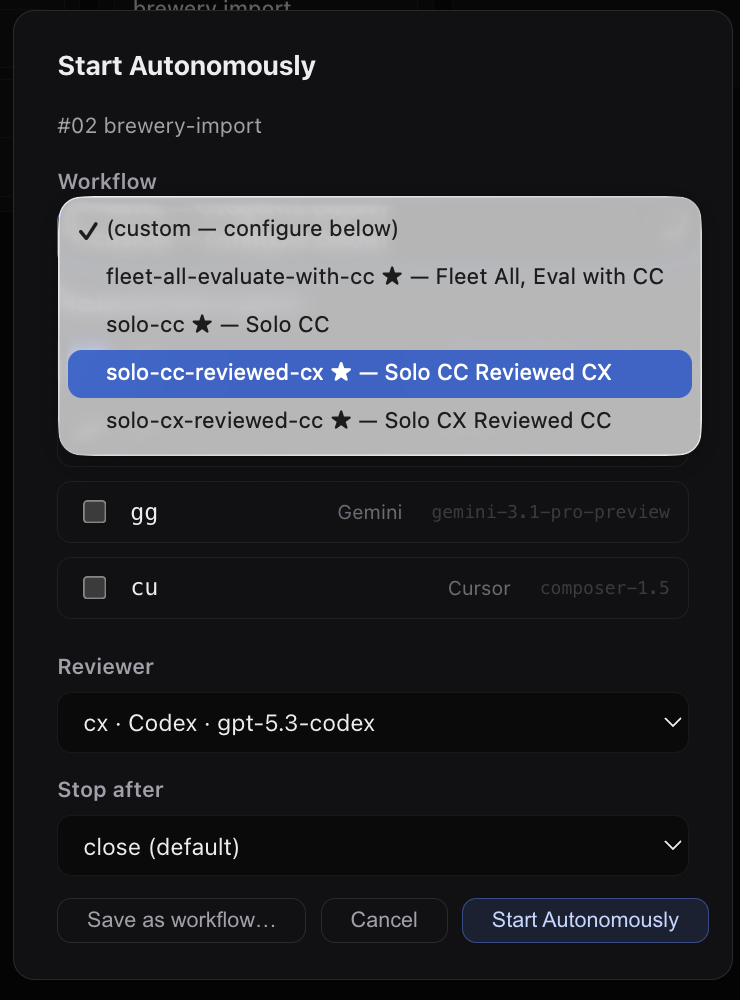
Anatomy of a workflow definition
Every workflow is a JSON file with a slug, label, description, and ordered stages. The built-in solo-cc-reviewed-cx workflow is a good starting point — CC implements, CX reviews, CC addresses the review feedback, and the feature auto-closes when ready:
{
  "slug": "solo-cc-reviewed-cx",
  "label": "Solo Reviewed",
  "description": "Implement with CC, review with CX, revision with CC, then close",
  "stages": [
    { "type": "implement", "agents": ["cc"] },
    { "type": "review", "agents": ["cx"] },
    { "type": "revision", "agents": ["cc"] },
    { "type": "close" }
  ]
}
Copy one as a starting point with aigon workflow create my-reviewed --from=solo-cc-reviewed-cx, or write a JSON file and pass it with --file=<path>.
--stop-after options
The stop-after value controls where autonomy ends. Available values differ by mode:
Solo mode
| Value | Behaviour |
|---|---|
implement | Stop after the agent submits — hand back control |
review | Stop when the review session starts — wait for it manually, then close |
close | Default. Implement → review (if set) → close automatically |
Fleet mode
| Value | Behaviour |
|---|---|
implement | Stop after all agents signal implementation-complete — skip eval |
eval | Stop after evaluation starts — pick winner and close manually |
close | Default. Implement → eval → auto-close the winner |
Monitoring
While the AutoConductor is running, the dashboard shows a Running autonomously badge on the feature card.
From the moment the run starts, the dashboard also shows the full planned stage sequence for that autonomous workflow, not just the currently active stage. That makes it clear up front whether the run is expected to stop after implement, continue into review, branch into eval, or auto-close at the end.
# Check AutoConductor status and current workflow state
aigon feature-autonomous-start status 42

# Attach to watch the poll log live
tmux attach -t <repo>-f42-auto
Poll log output shows exactly what the AutoConductor sees on each cycle:
[09:15:17] state=implementing agents=[cc=running] allReady=false ...
[09:16:47] state=implementing agents=[cc=ready] allReady=true ...
🚀 Spawning review session: brewboard-f42-review-ag-...
✅ Started review session: brewboard-f42-review-ag-...
  [review-start 1/10] running=true
✅ Review started. Waiting for review agent to complete...
  [review-close 1/120] reviewCompleted=false reviewState=in-progress
  [review-close 2/120] reviewCompleted=true reviewState=idle
✅ Review completion signaled. Proceeding to close.
🚀 Triggering: aigon feature-close 42
✅ Feature closed. AutoConductor finished.
Lifecycle states & card badges
As the AutoConductor moves a feature through implement → review → revision → close, the dashboard card reflects the current lifecycle state with a coloured chip in the card header. The state is canonical — it lives on the workflow snapshot, not in frontend heuristics — and the badge maps one-to-one from the STATE_RENDER_META table the server attaches to every dashboard row.
The active states you’ll see during an autonomous run:
| State | Card badge | Meaning |
|---|---|---|
inbox / backlog | — | Pre-start. No badge. |
spec_review_in_progress | 📋 Spec review | A reviewer agent is reading the spec before implementation begins. |
spec_revision_in_progress | 📋 Revising spec | The author agent is addressing spec-review feedback. |
implementing | 🔨 Implementing | Implementation agent is writing code in the worktree. |
implementation-complete | — (agent row shows ✓ Complete) | Implementation agent has signalled completion. |
code_review_in_progress | 👀 Code review | A reviewer agent is reading the diff and writing review notes. |
code_revision_in_progress | ✍️ Addressing review | The implementer is addressing code-review feedback. Healthy productive state — not a warning. |
evaluating | ⚖️ Evaluating | Fleet mode only — the evaluator is comparing implementations and picking a winner. |
closing | 🚀 Closing | feature-close is running. |
close_recovery_in_progress | 🛠 Close recovery | An earlier close failed and a recovery pass is underway. |
done | — (card moves to Done column) | Feature merged and closed. |
Why some states have no badge: states that are already obvious from the column the card sits in (inbox, backlog, done, paused) or from the per-agent status row (implementation-complete, ready_for_review, the various *_complete states) skip the badge to avoid double-signalling. Active in-progress stages all carry a chip so it’s clear at a glance which sub-stage of an autonomous run is currently live.
Colour conventions: blue chips (📋, 👀, ✍️) mark productive review/revision passes; green chips (🔨, ⚖️, 🚀) mark the headline running stages (implement / evaluate / close). Amber 🛠 Close recovery is the one chip that intentionally signals “human attention may be needed.”
Resilience
If the AutoConductor dies mid-run, implementation, review, and eval sessions continue unaffected. Complete the feature manually from wherever it stopped:
aigon feature-code-review 42          # if review hasn't run
aigon feature-eval 42                 # if Fleet agents haven't been evaluated
aigon feature-close 42 cc             # merge (pass winning agent for Fleet)
No recovery state to clean up — the feature is in whatever stage it was when the AutoConductor stopped.
When to use
| Situation | Recommended |
|---|---|
| Routine feature, clear spec | Solo (cc) |
| Important feature, want a second opinion | Solo + reviewer (cc --review-agent=ag) |
| Critical feature, want best implementation | Fleet + eval (cc ag --eval-agent=cc) |
| Maximum coverage, minimal supervision | Fleet + eval + close (cc ag, default stop) |
For features that need ongoing direction or spec refinement mid-stream, stick with manual Drive mode.
Next steps
- Drive Mode — single agent, full control
- Fleet Mode — multiple agents competing in parallel
- Dashboard — monitor autonomous runs in real-time
workflowreference — save and reuse autonomous-run configurations by slug